Using Copilot with Outlook – Presentation Deck
Using Copilot with Outlook – Presentation Deck

A PowerPoint presentation designed to support instructor-led training and help learners understand how Copilot in Outlook can improve email productivity and communication.
Using Copilot with Outlook – Presentation Deck

Overview

Audience

Corporate learners participating in instructor-led training sessions.

The Challenge

Learners need a clear, visual introduction to Copilot features to support understanding and engagement during training.

The Solution

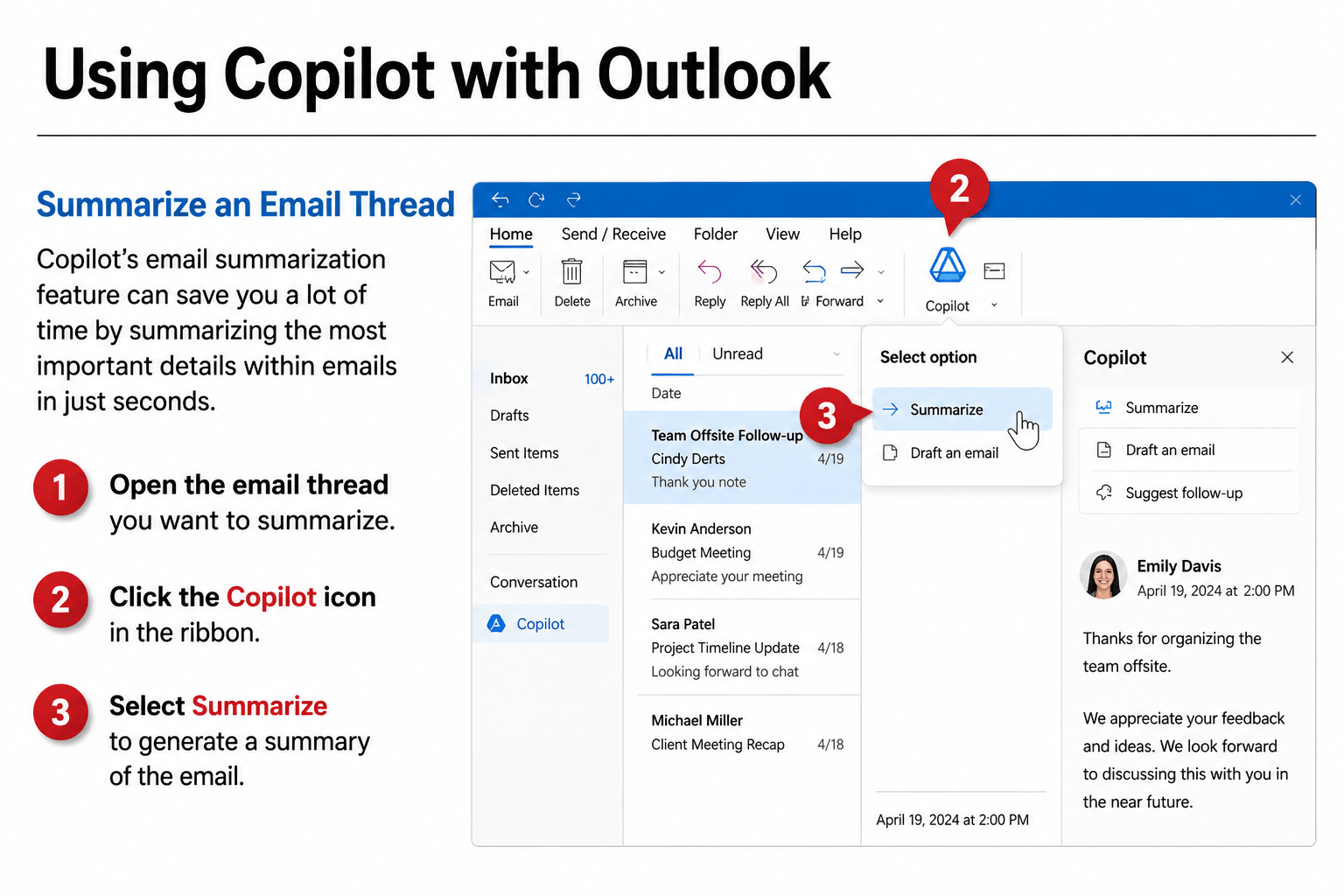
A PowerPoint presentation designed to support ILT (Instructor-Led Training) delivery, incorporating visuals, step-by-step demonstrations, and guided instruction.

Using Copilot with Outlook – Facilitator Manual

Using Copilot
with Outlook –
Facilitator Manual

An instructor-led training manual that helps facilitators teach business professionals how to use Copilot in Outlook to summarize emails, draft responses, and manage communication with greater efficiency.

Using Copilot
with Outlook –
Facilitator Manual

Overview

Audience

Business professionals using Microsoft Outlook with Microsoft Copilot enabled.

The Challenge

Many users are unfamiliar with how to effectively use Microsoft Copilot to summarize emails, draft responses, and manage communication efficiently.

The Solution

A structured instructor-led training (ILT) manual that guides learners through key Copilot features in Outlook, including summarization, drafting emails, and managing inbox workflows.

Visualizing Your Success

Visualizing Your Success

Defining your vision through reflection, values, and intentional decision-making

A narrative-driven video experience that guides learners from reflection to clarity—helping them identify what matters most and make more intentional decisions going forward.

Visualizing Your Success

Overview

Audience

Individuals seeking to define personal direction, clarify values, and make more intentional life and career decisions.

The Challenge

Many individuals move through life reacting to external expectations and day-to-day demands without a clear sense of direction. While they may stay busy and productive, they often lack alignment with what truly matters, leading to uncertainty, dissatisfaction, and unclear decision-making.

The Solution

A narrative-driven learning experience that guides learners through structured reflection, helping them identify core values, define a personal vision, and understand how those values shape decisions and long-term outcomes.

Design Approach

Pacing, tone, and narrative progression replace traditional interaction—creating space for reflection without requiring on-screen input.

Narrative-Driven Learning

Narrative-Driven Learning

A central character (Tasha) provides a relatable storyline that mirrors the learner's experience and creates continuity throughout the course.

Guided Visualization

Guided Visualization

A structured visualization sequence helps learners connect concepts to personal meaning and future goals.

Simulated Interaction Through Pacing

Simulated Interaction Through Pacing

Strategic pauses, narration timing, and pacing create space for reflection without requiring on-screen input.

Progressive Concept Flow

Progressive Concept Flow

Content moves from reflection → values → decision-making → action, building understanding step by step.

Audio & Motion Design

Audio & Motion Design

Intentional use of music, narration, and subtle motion (zoom, transitions) reinforces emotional tone and learner focus.

How It Works

Reflection Prompt

Learners are introduced to a reflective scenario that encourages them to think about their current direction.

Guided Visualization

A structured visualization helps learners imagine future outcomes and identify what matters most.

Values Identification

Learners explore and clarify their core values.

Decision Framing

Concepts are connected to real-life decisions and priorities.

Application & Reflection

Learners reflect on how their values can guide future actions and choices.

Results / Outcomes

Pilot testing (8 participants) indicated:

  • Learners reported increased clarity around personal values and direction
  • Reflection prompts described as impactful and thought-provoking
  • Narrative format maintained engagement without interaction

SME validation:

  • The experience effectively supports reflection-based learning
  • The narrative and pacing approach aligns with best practices for mindset and behavior-focused training
Expanding Your 
Circle of Influence

Expanding Your Circle of Influence

Expanding Your 
Circle of Influence

Helps professionals make better decisions under pressure by shifting focus from what they can't control to what they can—improving clarity, confidence, and effectiveness in high-stakes situations.

Overview

Audience

Team-based professionals in fast-paced environments—such as operations teams, project managers, and corporate professionals—who must make effective decisions under pressure while balancing competing priorities.

The Challenge

In high-pressure situations, individuals often focus on factors outside their control—tight deadlines, other people's actions, and shifting expectations.

This external focus leads to:

  • Reactive decision-making
  • Increased stress and frustration
  • Reduced effectiveness in critical moments

The Solution

An interactive eLearning experience that helps learners recognize where their attention is focused—and actively redirect it toward their Circle of Influence through realistic scenarios, guided decisions, and immediate feedback.

The goal isn't just to teach the concept—it's to help learners experience the consequences of their decisions.

Design Approach

This course uses a decision-based learning model, allowing learners to actively apply concepts rather than passively consume content.

Scenario-Based Learning

Scenario-Based Learning

Learners navigate realistic workplace situations that mirror actual decision-making pressure.

Branching Feedback

Branching Feedback

Each decision triggers immediate, context-specific feedback—reinforcing effective behaviors and highlighting consequences.

Variable-Driven Tracking

Variable-Driven Tracking

Influence Score vs. Concern Score tracks learner choices across scenarios, providing a measurable representation of focus and growth.

Visual Reinforcement

Visual Reinforcement

Dynamic visuals (expanding/shrinking circle) reflect learner decisions in real time, making abstract concepts tangible.

Character-Based Perspective

Character-Based Perspective

Learners engage through relatable characters, increasing immersion and relevance.

How It Works

Realistic Scenario Introduction

Learners encounter a workplace situation involving competing priorities and external pressure.

Decision Point with Meaningful Tradeoffs

The learner chooses how to respond—each option representing a different focus (control vs. concern).

Contextual Feedback & Consequences

Immediate feedback explains not just what happened—but why the choice was effective or ineffective.

Dynamic Score Tracking

Influence vs. Concern scores update in real time, reinforcing patterns in learner behavior.

Visual Progression of Focus

The learner's circle expands or contracts based on decisions—visually reinforcing the concept of control.

Results / Outcomes

Pilot testing (8 participants) indicated:

  • 100% of participants reported increased confidence in applying the Circle of Influence concept
  • Learners demonstrated improved ability to distinguish between controllable and uncontrollable factors
  • Strong engagement driven by realistic scenarios and immediate feedback

SME validation:

  • Confirmed scenarios reflected real workplace challenges
  • Endorsed the model as directly applicable to real-world decision-making

Breaking Barriers: Nonverbal Communication for Autism

Breaking Barriers: Nonverbal Communication for Autism

Helps individuals on the autism spectrum build confidence in reading and responding to non-verbal communication cues—across everyday social and workplace situations.

Breaking Barriers: Nonverbal Communication for Autism

Overview

Audience

Caregivers, educators, and support professionals who interact with autistic individuals—such as parents, teachers, therapists, and paraprofessionals—who need to recognize and respond appropriately to nonverbal communication cues.

The Challenge

In high-pressure situations, individuals often focus on factors outside their control—tight deadlines, other people's actions, and shifting expectations.

This external focus leads to:

  • Reactive decision-making
  • Increased stress and frustration
  • Reduced effectiveness in critical moments

The Solution

An interactive eLearning experience that helps learners recognize where their attention is focused—and actively redirect it toward their Circle of Influence through realistic scenarios, guided decisions, and immediate feedback.

Design Approach

This course uses a structured, learner-centered model that emphasizes clarity, repetition, and real-world application—supporting learners in building confidence step by step.

1. Structured Learning Path

1. Structured Learning Path

Learners progress through a clear sequence: Introduction → Exploration → Practice → Reinforcement designed to build understanding step by step.

2. Guided Exploration

2. Guided Exploration

Flashcards, accordions, and labeled visuals break down key concepts into manageable, easy-to-understand pieces.

3. Scenario-Based Practice

3. Scenario-Based Practice

Real-world examples allow learners to interpret non-verbal cues in context and apply what they've learned.

4. Knowledge Checks & Feedback

4. Knowledge Checks & Feedback

Frequent knowledge checks provide immediate, supportive feedback to reinforce understanding.

5. Reflection & Real-World Connection

5. Reflection & Real-World Connection

"Think About It" prompts encourage learners to connect content to their own experiences and apply it in everyday situations.

The goal is to turn something often abstract and confusing into something clear, structured, and actionable in everyday situations.

How It Works

Concept Introduction

Learners are introduced to a specific type of non-verbal communication through clear explanations and examples.

Guided Exploration

Interactive elements such as flashcards and labeled visuals break down key cues into simple, recognizable patterns.

Real-World Examples

Learners review realistic scenarios that demonstrate how non-verbal cues appear in everyday interactions.

Knowledge Check

Short, focused questions reinforce understanding and provide immediate feedback.

Reflection & Application

"Think About It" prompts encourage learners to connect what they've learned to their own experiences and apply it in real situations.

Results / Outcomes

Pilot testing (8 participants) indicated:

  • Learners reported increased confidence in recognizing and interpreting non-verbal communication cues
  • Visual examples and structured breakdowns made abstract concepts easier to understand
  • Scenarios were described as relatable and helpful for real-world application

SME validation:

  • Learning professionals confirmed the content reflects real-world communication challenges
  • The structured approach aligns with best practices for learners who benefit from clarity and guided instruction